
UI/UX & Design Systems
Interface patterns, tokens, and components so product teams stop inventing a new button every sprint.
Talk to an expert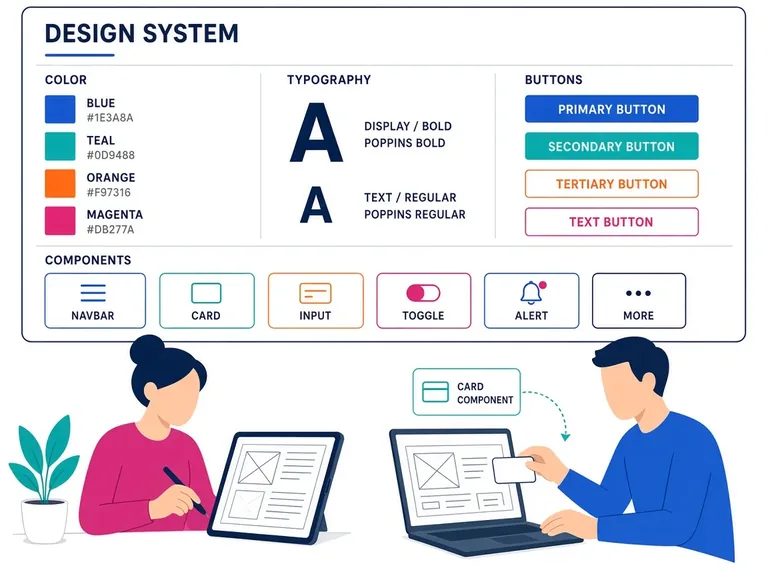
The offering
What we actually deliver
A design system is useful when two or more surfaces must feel like one company. We start with brand, accessibility, and the actual screens in flight — not with a 200-component library nobody will implement. Tokens for colour, type, and spacing land first. Then the components you already repeat: buttons, forms, navigation, tables, empty states.
Figma (or your tool) and code stay aligned. We implement the system in the frontend stack you ship — typically React — with documentation that a visiting engineer can follow. Accessibility is in the components, not a later audit that fails every form.
UX work sits beside the system: flows for the product you are launching, content patterns, and review of the awkward states (errors, permissions, loading). We will challenge screens that look finished and fail a real task.
You get tokens, a component library in repo, and usage guidance. Governance is light: how to add a component, how to deprecate one. A system that requires a committee for a padding change will be ignored. We also document the awkward states — empty, error, permission denied, and loading — so product squads stop inventing a new spinner and a new error banner on every screen.
What you get
How we work
A delivery path you can follow
Each engagement is sequenced so architecture, cutover, and handover are visible — not a black box at the end.
Talk to us about UI/UX & Design Systems
Share the current estate, deadline, and constraints — we will tell you what a first engagement should contain.